mirror of
https://github.com/harry0703/MoneyPrinterTurbo.git
synced 2026-02-21 16:37:21 +08:00

390 lines
14 KiB
Markdown
390 lines
14 KiB
Markdown
<div align="center">
|
||
<h1 align="center">MoneyPrinterTurbo 💸</h1>
|
||
|
||
<p align="center">
|
||
<a href="https://github.com/harry0703/MoneyPrinterTurbo/stargazers"><img src="https://img.shields.io/github/stars/harry0703/MoneyPrinterTurbo.svg?style=for-the-badge" alt="Stargazers"></a>
|
||
<a href="https://github.com/harry0703/MoneyPrinterTurbo/issues"><img src="https://img.shields.io/github/issues/harry0703/MoneyPrinterTurbo.svg?style=for-the-badge" alt="Issues"></a>
|
||
<a href="https://github.com/harry0703/MoneyPrinterTurbo/network/members"><img src="https://img.shields.io/github/forks/harry0703/MoneyPrinterTurbo.svg?style=for-the-badge" alt="Forks"></a>
|
||
<a href="https://github.com/harry0703/MoneyPrinterTurbo/blob/main/LICENSE"><img src="https://img.shields.io/github/license/harry0703/MoneyPrinterTurbo.svg?style=for-the-badge" alt="License"></a>
|
||
</p>
|
||
|
||
<h3>English | <a href="README.md">简体中文</a></h3>
|
||
|
||
<div align="center">
|
||
<a href="https://trendshift.io/repositories/8731" target="_blank"><img src="https://trendshift.io/api/badge/repositories/8731" alt="harry0703%2FMoneyPrinterTurbo | Trendshift" style="width: 250px; height: 55px;" width="250" height="55"/></a>
|
||
</div>
|
||
|
||
Simply provide a <b>topic</b> or <b>keyword</b> for a video, and it will automatically generate the video copy, video
|
||
materials, video subtitles, and video background music before synthesizing a high-definition short video.
|
||
|
||
### WebUI
|
||
|
||

|
||
|
||
### API Interface
|
||
|
||

|
||
|
||
</div>
|
||
|
||
## Special Thanks 🙏
|
||
|
||
Due to the **deployment** and **usage** of this project, there is a certain threshold for some beginner users. We would
|
||
like to express our special thanks to
|
||
|
||
**RecCloud (AI-Powered Multimedia Service Platform)** for providing a free `AI Video Generator` service based on this
|
||
project. It allows for online use without deployment, which is very convenient.
|
||
|
||
- Chinese version: https://reccloud.cn
|
||
- English version: https://reccloud.com
|
||
|
||

|
||
|
||
## Thanks for Sponsorship 🙏
|
||
|
||
Thanks to Picwish https://picwish.com for supporting and sponsoring this project, enabling continuous updates and maintenance.
|
||
|
||
Picwish focuses on the **image processing field**, providing a rich set of **image processing tools** that extremely simplify complex operations, truly making image processing easier.
|
||
|
||

|
||
|
||
## Features 🎯
|
||
|
||
- [x] Complete **MVC architecture**, **clearly structured** code, easy to maintain, supports both `API`
|
||
and `Web interface`
|
||
- [x] Supports **AI-generated** video copy, as well as **customized copy**
|
||
- [x] Supports various **high-definition video** sizes
|
||
- [x] Portrait 9:16, `1080x1920`
|
||
- [x] Landscape 16:9, `1920x1080`
|
||
- [x] Supports **batch video generation**, allowing the creation of multiple videos at once, then selecting the most
|
||
satisfactory one
|
||
- [x] Supports setting the **duration of video clips**, facilitating adjustments to material switching frequency
|
||
- [x] Supports video copy in both **Chinese** and **English**
|
||
- [x] Supports **multiple voice** synthesis, with **real-time preview** of effects
|
||
- [x] Supports **subtitle generation**, with adjustable `font`, `position`, `color`, `size`, and also
|
||
supports `subtitle outlining`
|
||
- [x] Supports **background music**, either random or specified music files, with adjustable `background music volume`
|
||
- [x] Video material sources are **high-definition** and **royalty-free**, and you can also use your own **local materials**
|
||
- [x] Supports integration with various models such as **OpenAI**, **Moonshot**, **Azure**, **gpt4free**, **one-api**, **Qwen**, **Google Gemini**, **Ollama**, **DeepSeek**, **ERNIE**, **Pollinations** and more
|
||
|
||
### Future Plans 📅
|
||
|
||
- [ ] GPT-SoVITS dubbing support
|
||
- [ ] Optimize voice synthesis using large models for more natural and emotionally rich voice output
|
||
- [ ] Add video transition effects for a smoother viewing experience
|
||
- [ ] Add more video material sources, improve the matching between video materials and script
|
||
- [ ] Add video length options: short, medium, long
|
||
- [ ] Support more voice synthesis providers, such as OpenAI TTS
|
||
- [ ] Automate upload to YouTube platform
|
||
|
||
## Video Demos 📺
|
||
|
||
### Portrait 9:16
|
||
|
||
<table>
|
||
<thead>
|
||
<tr>
|
||
<th align="center"><g-emoji class="g-emoji" alias="arrow_forward">▶️</g-emoji> How to Add Fun to Your Life </th>
|
||
<th align="center"><g-emoji class="g-emoji" alias="arrow_forward">▶️</g-emoji> What is the Meaning of Life</th>
|
||
</tr>
|
||
</thead>
|
||
<tbody>
|
||
<tr>
|
||
<td align="center"><video src="https://github.com/harry0703/MoneyPrinterTurbo/assets/4928832/a84d33d5-27a2-4aba-8fd0-9fb2bd91c6a6"></video></td>
|
||
<td align="center"><video src="https://github.com/harry0703/MoneyPrinterTurbo/assets/4928832/112c9564-d52b-4472-99ad-970b75f66476"></video></td>
|
||
</tr>
|
||
</tbody>
|
||
</table>
|
||
|
||
### Landscape 16:9
|
||
|
||
<table>
|
||
<thead>
|
||
<tr>
|
||
<th align="center"><g-emoji class="g-emoji" alias="arrow_forward">▶️</g-emoji> What is the Meaning of Life</th>
|
||
<th align="center"><g-emoji class="g-emoji" alias="arrow_forward">▶️</g-emoji> Why Exercise</th>
|
||
</tr>
|
||
</thead>
|
||
<tbody>
|
||
<tr>
|
||
<td align="center"><video src="https://github.com/harry0703/MoneyPrinterTurbo/assets/4928832/346ebb15-c55f-47a9-a653-114f08bb8073"></video></td>
|
||
<td align="center"><video src="https://github.com/harry0703/MoneyPrinterTurbo/assets/4928832/271f2fae-8283-44a0-8aa0-0ed8f9a6fa87"></video></td>
|
||
</tr>
|
||
</tbody>
|
||
</table>
|
||
|
||
## System Requirements 📦
|
||
|
||
- Recommended minimum 4 CPU cores or more, 4G of memory or more, GPU is not required
|
||
- Windows 10 or MacOS 11.0, and their later versions
|
||
|
||
## Quick Start 🚀
|
||
|
||
### Run in Google Colab
|
||
Want to try MoneyPrinterTurbo without setting up a local environment? Run it directly in Google Colab!
|
||
|
||
[](https://colab.research.google.com/github/harry0703/MoneyPrinterTurbo/blob/main/docs/MoneyPrinterTurbo.ipynb)
|
||
|
||
|
||
### Windows
|
||
|
||
Google Drive (v1.2.6): https://drive.google.com/file/d/1HsbzfT7XunkrCrHw5ncUjFX8XX4zAuUh/view?usp=sharing
|
||
|
||
After downloading, it is recommended to **double-click** `update.bat` first to update to the **latest code**, then double-click `start.bat` to launch
|
||
|
||
After launching, the browser will open automatically (if it opens blank, it is recommended to use **Chrome** or **Edge**)
|
||
|
||
### Other Systems
|
||
|
||
One-click startup packages have not been created yet. See the **Installation & Deployment** section below. It is recommended to use **docker** for deployment, which is more convenient.
|
||
|
||
## Installation & Deployment 📥
|
||
|
||
### Prerequisites
|
||
|
||
#### ① Clone the Project
|
||
|
||
```shell
|
||
git clone https://github.com/harry0703/MoneyPrinterTurbo.git
|
||
```
|
||
|
||
#### ② Modify the Configuration File
|
||
|
||
- Copy the `config.example.toml` file and rename it to `config.toml`
|
||
- Follow the instructions in the `config.toml` file to configure `pexels_api_keys` and `llm_provider`, and according to
|
||
the llm_provider's service provider, set up the corresponding API Key
|
||
|
||
### Docker Deployment 🐳
|
||
|
||
#### ① Launch the Docker Container
|
||
|
||
If you haven't installed Docker, please install it first https://www.docker.com/products/docker-desktop/
|
||
If you are using a Windows system, please refer to Microsoft's documentation:
|
||
|
||
1. https://learn.microsoft.com/en-us/windows/wsl/install
|
||
2. https://learn.microsoft.com/en-us/windows/wsl/tutorials/wsl-containers
|
||
|
||
```shell
|
||
cd MoneyPrinterTurbo
|
||
docker-compose up
|
||
```
|
||
|
||
> Note:The latest version of docker will automatically install docker compose in the form of a plug-in, and the start command is adjusted to `docker compose up `
|
||
|
||
#### ② Access the Web Interface
|
||
|
||
Open your browser and visit http://0.0.0.0:8501
|
||
|
||
#### ③ Access the API Interface
|
||
|
||
Open your browser and visit http://0.0.0.0:8080/docs Or http://0.0.0.0:8080/redoc
|
||
|
||
### Manual Deployment 📦
|
||
|
||
#### ① Create a Python Virtual Environment
|
||
|
||
It is recommended to create a Python virtual environment using [conda](https://conda.io/projects/conda/en/latest/user-guide/install/index.html)
|
||
|
||
```shell
|
||
git clone https://github.com/harry0703/MoneyPrinterTurbo.git
|
||
cd MoneyPrinterTurbo
|
||
conda create -n MoneyPrinterTurbo python=3.11
|
||
conda activate MoneyPrinterTurbo
|
||
pip install -r requirements.txt
|
||
```
|
||
|
||
#### ② Install ImageMagick
|
||
|
||
###### Windows:
|
||
|
||
- Download https://imagemagick.org/script/download.php Choose the Windows version, make sure to select the **static library** version, such as ImageMagick-7.1.1-32-Q16-x64-**static**.exe
|
||
- Install the downloaded ImageMagick, **do not change the installation path**
|
||
- Modify the `config.toml` configuration file, set `imagemagick_path` to your actual installation path
|
||
|
||
###### MacOS:
|
||
|
||
```shell
|
||
brew install imagemagick
|
||
````
|
||
|
||
###### Ubuntu
|
||
|
||
```shell
|
||
sudo apt-get install imagemagick
|
||
```
|
||
|
||
###### CentOS
|
||
|
||
```shell
|
||
sudo yum install ImageMagick
|
||
```
|
||
|
||
#### ③ Launch the Web Interface 🌐
|
||
|
||
Note that you need to execute the following commands in the `root directory` of the MoneyPrinterTurbo project
|
||
|
||
###### Windows
|
||
|
||
```bat
|
||
webui.bat
|
||
```
|
||
|
||
###### MacOS or Linux
|
||
|
||
```shell
|
||
sh webui.sh
|
||
```
|
||
|
||
After launching, the browser will open automatically
|
||
|
||
#### ④ Launch the API Service 🚀
|
||
|
||
```shell
|
||
python main.py
|
||
```
|
||
|
||
After launching, you can view the `API documentation` at http://127.0.0.1:8080/docs and directly test the interface
|
||
online for a quick experience.
|
||
|
||
## Voice Synthesis 🗣
|
||
|
||
A list of all supported voices can be viewed here: [Voice List](./docs/voice-list.txt)
|
||
|
||
2024-04-16 v1.1.2 Added 9 new Azure voice synthesis voices that require API KEY configuration. These voices sound more realistic.
|
||
|
||
## Subtitle Generation 📜
|
||
|
||
Currently, there are 2 ways to generate subtitles:
|
||
|
||
- **edge**: Faster generation speed, better performance, no specific requirements for computer configuration, but the
|
||
quality may be unstable
|
||
- **whisper**: Slower generation speed, poorer performance, specific requirements for computer configuration, but more
|
||
reliable quality
|
||
|
||
You can switch between them by modifying the `subtitle_provider` in the `config.toml` configuration file
|
||
|
||
It is recommended to use `edge` mode, and switch to `whisper` mode if the quality of the subtitles generated is not
|
||
satisfactory.
|
||
|
||
> Note:
|
||
>
|
||
> 1. In whisper mode, you need to download a model file from HuggingFace, about 3GB in size, please ensure good internet connectivity
|
||
> 2. If left blank, it means no subtitles will be generated.
|
||
|
||
> Since HuggingFace is not accessible in China, you can use the following methods to download the `whisper-large-v3` model file
|
||
|
||
Download links:
|
||
|
||
- Baidu Netdisk: https://pan.baidu.com/s/11h3Q6tsDtjQKTjUu3sc5cA?pwd=xjs9
|
||
- Quark Netdisk: https://pan.quark.cn/s/3ee3d991d64b
|
||
|
||
After downloading the model, extract it and place the entire directory in `.\MoneyPrinterTurbo\models`,
|
||
The final file path should look like this: `.\MoneyPrinterTurbo\models\whisper-large-v3`
|
||
|
||
```
|
||
MoneyPrinterTurbo
|
||
├─models
|
||
│ └─whisper-large-v3
|
||
│ config.json
|
||
│ model.bin
|
||
│ preprocessor_config.json
|
||
│ tokenizer.json
|
||
│ vocabulary.json
|
||
```
|
||
|
||
## Background Music 🎵
|
||
|
||
Background music for videos is located in the project's `resource/songs` directory.
|
||
> The current project includes some default music from YouTube videos. If there are copyright issues, please delete
|
||
> them.
|
||
|
||
## Subtitle Fonts 🅰
|
||
|
||
Fonts for rendering video subtitles are located in the project's `resource/fonts` directory, and you can also add your
|
||
own fonts.
|
||
|
||
## Common Questions 🤔
|
||
|
||
### ❓RuntimeError: No ffmpeg exe could be found
|
||
|
||
Normally, ffmpeg will be automatically downloaded and detected.
|
||
However, if your environment has issues preventing automatic downloads, you may encounter the following error:
|
||
|
||
```
|
||
RuntimeError: No ffmpeg exe could be found.
|
||
Install ffmpeg on your system, or set the IMAGEIO_FFMPEG_EXE environment variable.
|
||
```
|
||
|
||
In this case, you can download ffmpeg from https://www.gyan.dev/ffmpeg/builds/, unzip it, and set `ffmpeg_path` to your
|
||
actual installation path.
|
||
|
||
```toml
|
||
[app]
|
||
# Please set according to your actual path, note that Windows path separators are \\
|
||
ffmpeg_path = "C:\\Users\\harry\\Downloads\\ffmpeg.exe"
|
||
```
|
||
|
||
### ❓ImageMagick is not installed on your computer
|
||
|
||
[issue 33](https://github.com/harry0703/MoneyPrinterTurbo/issues/33)
|
||
|
||
1. Follow the `example configuration` provided `download address` to
|
||
install https://imagemagick.org/archive/binaries/ImageMagick-7.1.1-30-Q16-x64-static.exe, using the static library
|
||
2. Do not install in a path with Chinese characters to avoid unpredictable issues
|
||
|
||
[issue 54](https://github.com/harry0703/MoneyPrinterTurbo/issues/54#issuecomment-2017842022)
|
||
|
||
For Linux systems, you can manually install it, refer to https://cn.linux-console.net/?p=16978
|
||
|
||
Thanks to [@wangwenqiao666](https://github.com/wangwenqiao666) for their research and exploration
|
||
|
||
### ❓ImageMagick's security policy prevents operations related to temporary file @/tmp/tmpur5hyyto.txt
|
||
|
||
You can find these policies in ImageMagick's configuration file policy.xml.
|
||
This file is usually located in /etc/ImageMagick-`X`/ or a similar location in the ImageMagick installation directory.
|
||
Modify the entry containing `pattern="@"`, change `rights="none"` to `rights="read|write"` to allow read and write operations on files.
|
||
|
||
### ❓OSError: [Errno 24] Too many open files
|
||
|
||
This issue is caused by the system's limit on the number of open files. You can solve it by modifying the system's file open limit.
|
||
|
||
Check the current limit:
|
||
|
||
```shell
|
||
ulimit -n
|
||
```
|
||
|
||
If it's too low, you can increase it, for example:
|
||
|
||
```shell
|
||
ulimit -n 10240
|
||
```
|
||
|
||
### ❓Whisper model download failed, with the following error
|
||
|
||
LocalEntryNotfoundEror: Cannot find an appropriate cached snapshotfolderfor the specified revision on the local disk and
|
||
outgoing trafic has been disabled.
|
||
To enablerepo look-ups and downloads online, pass 'local files only=False' as input.
|
||
|
||
or
|
||
|
||
An error occured while synchronizing the model Systran/faster-whisper-large-v3 from the Hugging Face Hub:
|
||
An error happened while trying to locate the files on the Hub and we cannot find the appropriate snapshot folder for the
|
||
specified revision on the local disk. Please check your internet connection and try again.
|
||
Trying to load the model directly from the local cache, if it exists.
|
||
|
||
Solution: [Click to see how to manually download the model from netdisk](#subtitle-generation-)
|
||
|
||
## Feedback & Suggestions 📢
|
||
|
||
- You can submit an [issue](https://github.com/harry0703/MoneyPrinterTurbo/issues) or
|
||
a [pull request](https://github.com/harry0703/MoneyPrinterTurbo/pulls).
|
||
|
||
## License 📝
|
||
|
||
Click to view the [`LICENSE`](LICENSE) file
|
||
|
||
## Star History
|
||
|
||
[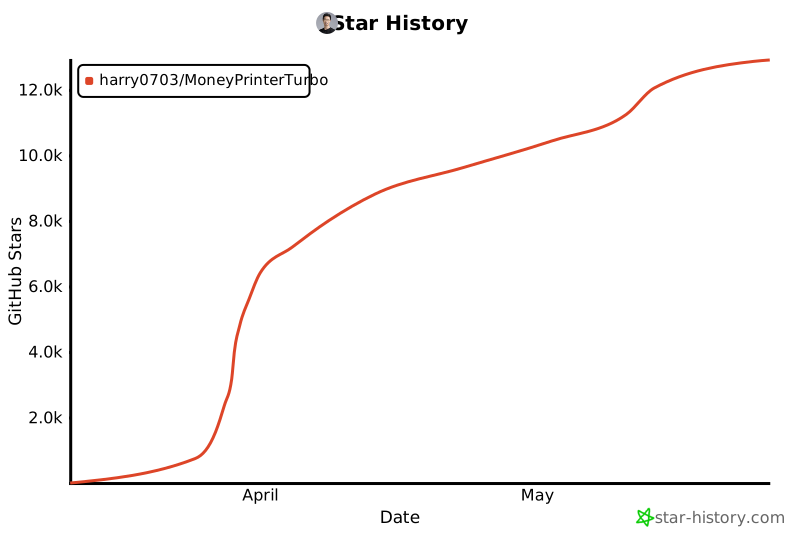](https://star-history.com/#harry0703/MoneyPrinterTurbo&Date)
|